
Movavi vs Adobe® Express® for Promo and Marketing Videos

Try Movavi Video Editor:

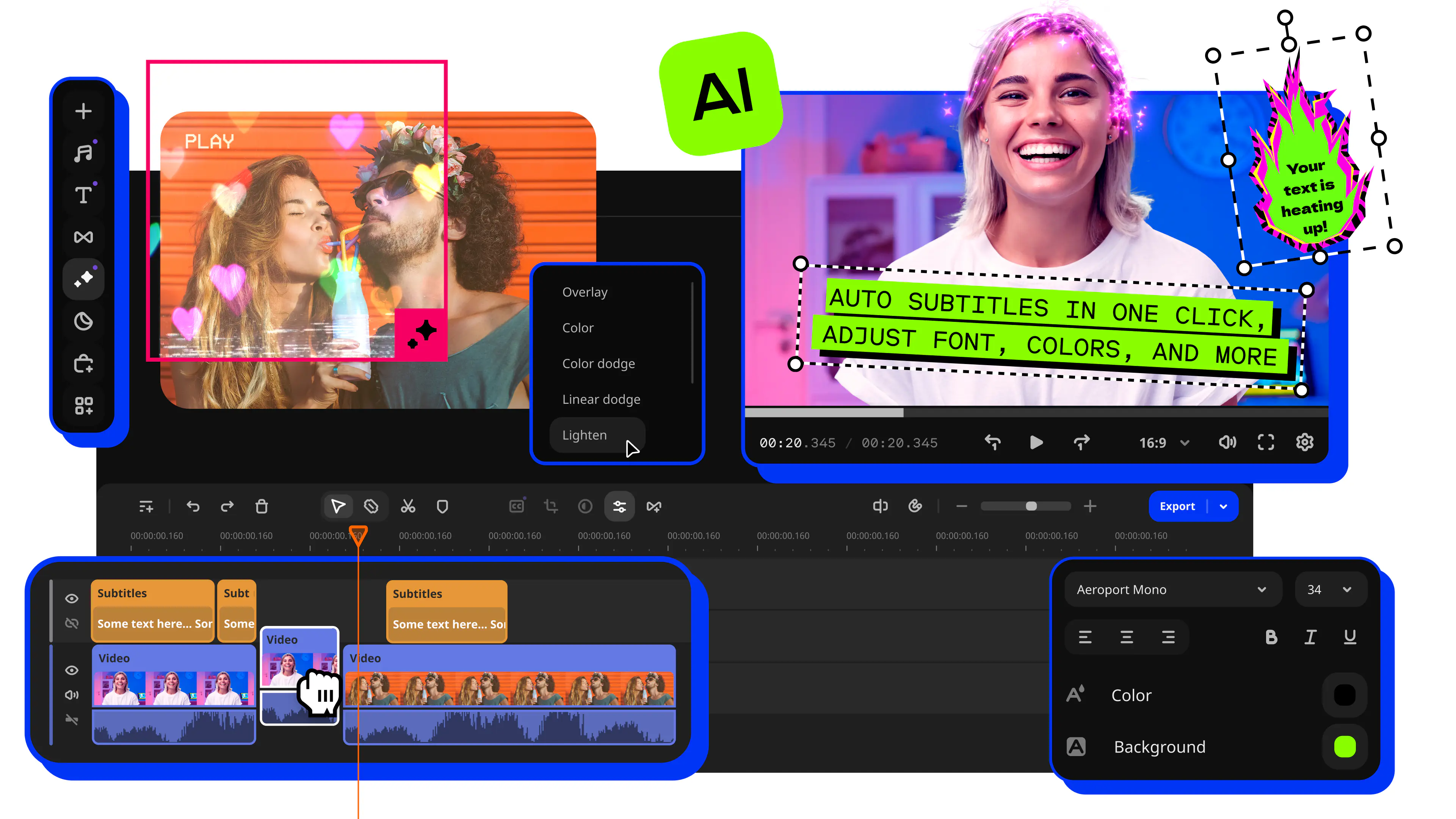
  • Fast and easy editing: cut, crop, adjust colors and speed

  • One-click AI tools: auto subtitles, noise removal, and more

  • Hundreds of effects: titles, transitions, filters, overlays, music

  • Video templates: pro-looking edits for any kind of video

By clicking the download button, you're downloading a free version of the program.*

Edited by
Ben Jacklin
13,742

Movavi vs Adobe® Express® comes down to the kind of promo you need. Adobe® Express® suits a quick animated post or a short promo built from a layout, in a browser. Movavi Video Editor suits a promo made from your own footage on the desktop, with a timeline, subtitles, and room for longer clips.

Looking for an Adobe® Express® alternative for video? This comparison suits you if you run a small online shop, manage social media at a company, or share skincare tips and want to feature a product on camera. We compare the two promo video makers on six criteria: promo templates, brand kit, editing depth, AI tools, social media formats, and product type.

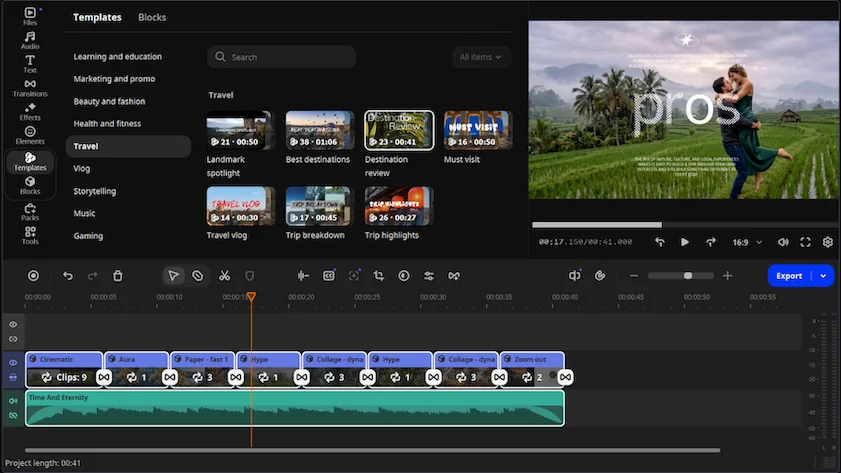
Templates come first, because that is where most promos start. Adobe® Express® video templates are layouts for posts, stories, and short videos. Movavi Video Templates is a multi-style library of customizable, pro-looking, modular templates for any kind of video.

Adobe® Express® vs Movavi at a glance

Criterion

Movavi Video Editor

Adobe® Express®

Product type

Desktop app

Web builder with a mobile app

Platforms

Windows, macOS

Browser, mobile app

Best for

Product promos and brand videos from your own footage

Quick animated posts and short promos from a layout

The two promo video makers in brief

  • Best for

    small business owners and office workers who make social media ads and brand videos for Instagram or Facebook, and creators who feature a product in skincare or fashion tips.

Why it fits: Movavi Video Editor is an intuitive video editor with customizable video templates, one-click AI tools, and hundreds of drag-and-drop effects. It is a desktop app for Windows and macOS. Hover over a clip, an effect, or a transition, and you see a preview before you apply anything. Drop an effect on the timeline, and it is applied. A promo that looks finished on the first try comes from the template and the auto subtitles doing the routine work. If you’re in search of fresh ideas, check out Movavi Ideas – a free tutorial hub with a new step-by-step idea every week.

Key features:

  • Auto subtitles: 100+ languages recognized, with 60+ designs to pick from.
  • Auto-tracked cropping: keeps the speaker or product centered when horizontal footage becomes vertical.
  • Speed control: footage speeds up to 100x, so a long recording becomes a short time-lapse.
  • Built-in effects: transitions, titles, filters, and overlays, plus copyright-free music. The Movavi Effects subscription adds 1,500+ royalty-free tracks.
Pros:
  • Every AI tool is included in the full version, with no credit system.

  • It works offline and runs on low-end PCs.

  • Several templates come with the full version at no extra charge.

Cons:
  • Lacks advanced, detailed controls for a professional workflow.

  • No flexible UI customization.

  • No web version or cloud integration.

Price and platforms: Desktop app for Windows and macOS. The full version is a monthly or yearly subscription; starting price: $19.95/month. The free version exports with a watermark and a 60-second length cap.

  • Best for

    social media and marketing work in small businesses; social media graphics such as quick posts and banners with a video insert, and templated ad videos.

Why it fits: Adobe® Express® is a lightweight web builder for social media and marketing materials. It works as a template-based social media video maker and a marketing video maker for short, templated ads. The interface is drag-and-drop, and each template is edited right on the canvas.

Key features:

  • Templates for posts, stories, and short videos, edited as a layout.
  • Firefly generative AI: generates images, videos, and text.
  • One-click resizing for social formats.
  • Music library, with the extended library on Premium.
  • Adobe Stock integration; full access is paid.
Pros:
  • Drag-and-drop editing right on the canvas.

  • Templates and resizing for Reels, TikTok, and Shorts.

  • Adobe Stock sits inside the same tool.

Cons:
  • A basic editor, and not the best choice for long videos or complex edits.

  • No stabilization and no video noise removal.

  • Premium templates require a Premium subscription.

Price and platforms: Browser and mobile app; an Adobe account, sign-in, and internet connection are required. The free plan has limits on features, content, and AI credits. Premium is a monthly subscription at $9.99.

Which promo video maker has better templates?

Pick Adobe® Express® if your promo is a layout: an animated post, a story, a banner with a short video inside. The library is huge, and you edit each template right on the canvas.

Pick Movavi when the promo is a video with a start, a middle, and an end. A Movavi template is a ready-made project built from Blocks: short segments of the video, for example an intro, a countdown, a quick cut, or an animated collage. The template as a whole arrives with pre-set editing, music, transitions, and text. You fill each Block with your own clips, photos, and text, then reorder, add, or remove Blocks and change their color themes. Nothing is locked, so you can keep the template’s music or swap it for another track. For example, if you own a small online shop that needs a product promo video for Instagram, use the Hot deals or Limited offer template from the Marketing and promo category. A template gives the promo its structure, and you simply need to add your product clips. Several templates come with the full version of Movavi Video Editor; the whole collection is a separate Movavi Video Templates subscription.

Better for:

  • layouts and animated posts: Adobe® Express®
  • promo videos assembled from your own footage: Movavi Video Editor

Brand kit and collaboration

This round goes to Adobe® Express®, and it deserves the credit. It includes a brand kit, available on Premium. For a marketer who needs a series of promos in one look, that is a real advantage. Adobe® Express® also supports co-editing and commenting, which is useful when you work with a team.

Movavi Video Editor gives you tools to brand your footage. The Logo tool places an image or text logo with adjustable position, size, opacity, and duration. Title presets with custom fonts and colors can be saved and reused. Blocks change color themes, so one template can wear your colors across a series. The project stays on your computer, because Movavi has no web version or cloud integration. A portable project bundles the media with it, so you can open it on another computer.

Better for:

  • a ready-made brand setup: Adobe® Express®
  • adding a logo or customizing your titles: Movavi Video Editor

Editing depth

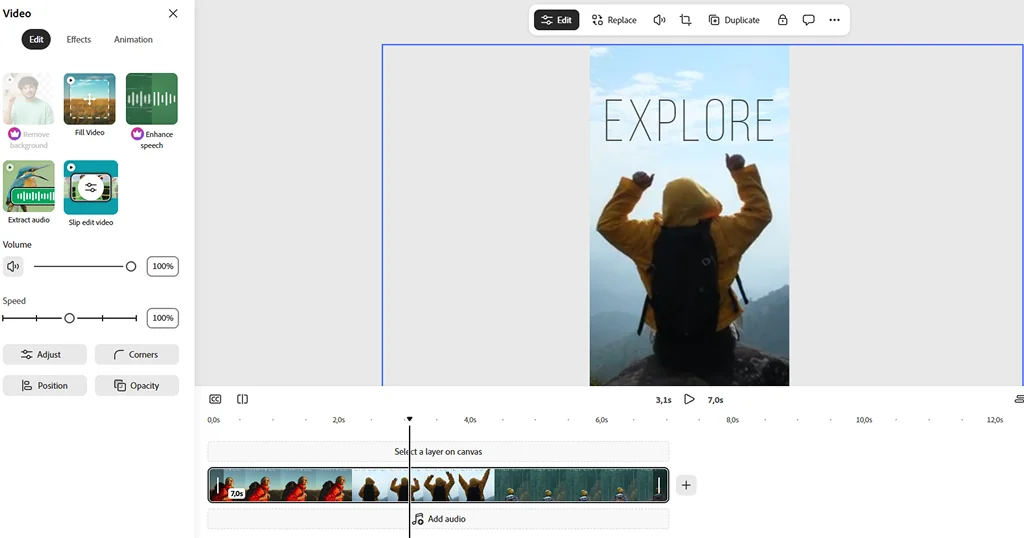
Adobe® Express® is a basic video editor on top of templates: cutting, layers, and animation. That works for animated posts and stories. Long videos and complex edits are where it runs out of road: there is no automatic pause removal, no stabilization, and no video noise removal.

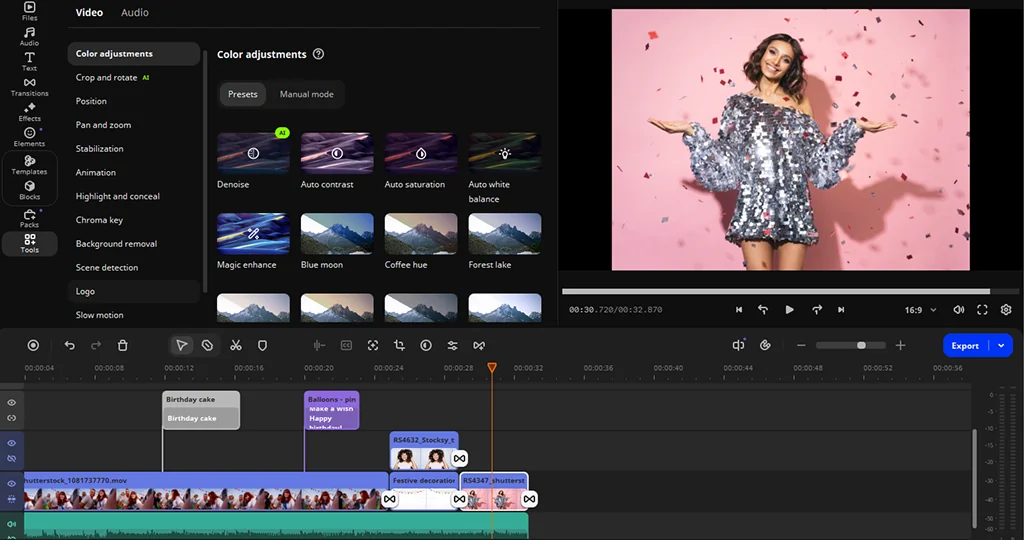
Movavi Video Editor supports multitrack video editing. Its timeline is drag-and-drop, with frame-accurate scrubbing and a Blade tool for precise cuts. Keyframe animation, chroma key, stabilization, and speed control are in the toolbox.

Better for:

  • animated posts and stories: Adobe® Express®
  • longer videos and demos with overlays: Movavi Video Editor
Movavi Video Editor timeline

Movavi Video Editor

Adobe Express timeline

Adobe® Express®

AI tools and credits

Both tools use AI, for different jobs.

Adobe® Express® uses Firefly to generate images, videos, and text. It also offers AI subtitles, video background removal, generative background fill, and Enhance Speech for a voice cleanup. Generative features run on credits, and the allowance depends on your plan. Higher allowances come with the Firefly Pro plan.

Movavi’s AI takes over the chores of editing your own footage, each in one click, with no credit system. If you recorded an ad on a busy shop floor, AI audio noise removal clears traffic, wind, and steady hums. For a talking-head promo, silence removal cuts the pauses. The rest of the set: auto subtitles with word-by-word highlighting, AI video denoise for low-light clips, AI motion tracking, and AI background removal that needs no green screen. All of it comes with the full version.

Better for:

  • generating new visuals: Adobe® Express®
  • cleaning up and captioning your own footage without counting credits: Movavi Video Editor

Platform and social media formats

Adobe® Express® runs in a browser and a mobile app, so you can start a quick video on a phone. It needs an Adobe account, sign-in, and an internet connection.

Movavi Video Editor lives on your desktop. It works offline, stays light on hardware, and runs even on low-end PCs. There is no web version.

Better for:

  • editing in a browser or on a phone: Adobe® Express®
  • offline desktop editing: Movavi Video Editor

Scenarios: which tool fits which promo?

A product promo video for Instagram. Adobe® Express® gives you a layout and a short animated promo, fast. In Movavi, you drop product clips into the Blocks of a promo video template, and auto-tracked cropping handles the vertical version.

A project demo for your site or your team. A demo is long and has layers: screen, presenter, logo. Movavi handles it with overlays on the timeline. Adobe® Express® fits better when the demo is a short animated teaser.

A series of ads in one look. Adobe® Express® brings the brand kit. Movavi brings the Logo tool, saved title presets, and Block color themes, which take a few more clicks.

A promo with subtitles. Say your Instagram ad has a voiceover. Both tools offer auto subtitles that turn the speech into captions in one click. You can choose where they sit on the screen and customize the style, font, and color to match your video.

What reviewers say

Users on Reddit and review sites praise Movavi for a simple, intuitive interface that lets you start editing without tutorials, for good value, and for a large library of effects, titles, and licensed music in the base version. The complaints: a strict export limit in the free version, add-on subscriptions for some effects and music, and confusing activation and payment because the program and the add-ons have separate licenses.

For Adobe® Express®, reviewers like how quickly a post or short video comes together from a template, the Adobe Stock and Adobe ecosystem integration, and commercially safe generative AI from Firefly. The complaints: very limited video editing, the best templates and features locked in Premium with credits that run out quickly, and slowdowns in the browser on large projects.

Verdict: how to choose

Choose Movavi Video Editor if you want a full video from your own footage: a product promo with subtitles, a project demo, or a skincare tip with a product in frame. You get a desktop timeline and AI tools with no credits to count. For a video editor for small business work that goes beyond layouts, that is the better fit.

Choose Adobe® Express® if you need quick videos, posts, stories, or short templated ads, you work in a browser or on a phone, and a brand kit matters. It is a strong marketing video maker for that job.

Movavi Video Editor
Create awesome videos easily

*The free version of Movavi Video Editor may have the following restrictions depending on the build: watermark on exported clips, 60-second video or 1/2 audio length limit, and/or some advanced features unavailable when exporting videos.

Frequently asked questions

Can I make a promo video for free?

Yes, with both. Adobe® Express® Free comes with limits on features, content, and AI credits. The free version of Movavi Video Editor gives you the essential tools plus auto subtitles, auto crop, and silence removal, and exports with a watermark and a video length cap.

Where are there more templates for promo videos?

Count by format. Adobe® Express® has a huge library of layouts for posts, stories, and short videos, with Premium templates on the paid plan. Movavi has a multi-style library of full video projects, including the Marketing and promo category. Several templates ship with the full version, and the whole collection is a separate subscription.

Can I use templates in ads?

Movavi requires a business license for commercial use. With Adobe® Express®, check the license terms on the official website.

Which video editor for small business is easier to learn?

Both are easy to learn. Adobe® Express® is drag-and-drop, and you edit templates on the canvas. Movavi adds interface tooltips, a how-to center, and guides. Pick by the job: a post from a layout goes quickly in Adobe® Express®, and a promo from your own footage goes quickly in Movavi.

Have questions?
If you can’t find the answer to your question, please feel free to contact our Support Team.
Join us for discounts, editing tips, and content ideas

1.5M+ users already subscribed to our newsletter

By signing up, I agree to receive marketing emails from Movavi and agree to Movavi's Privacy Policy.